Nokia 3310 用户指南

Set up and switch on your phone
Learn how to insert the SIM card, memory card, and battery, and how to switch on your phone.
Micro SIM

Important: This device is designed to be used with a micro SIM card (see figure) only. Use of incompatible SIM cards may damage the card or the device, and may corrupt data stored on the card. Please consult your mobile operator for the use of a SIM card that has a nano-UICC cutout.
MicroSD memory cards

Use only compatible memory cards approved for use with this device. Incompatible cards may damage the card and the device and corrupt data stored on the card.
Note: Switch the device off and disconnect the charger and any other device before removing any covers. Avoid touching electronic components while changing any covers. Always store and use the device with any covers attached.
Set up your phone (single SIM)
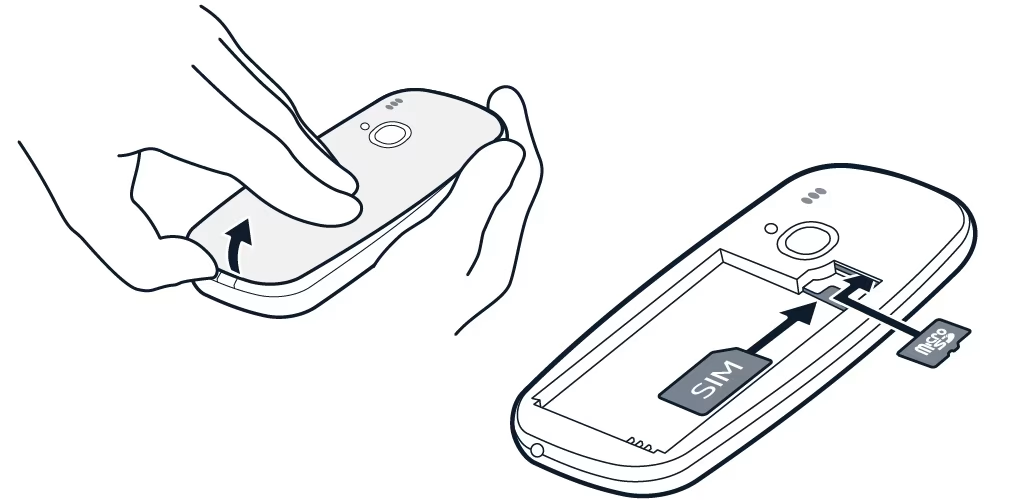
- Place your fingernail in the small slot at the bottom of the phone, lift and remove the cover.
- If the battery is in the phone, lift it out.
- Slide the SIM into the SIM slot with the contact area face down.
- If you have a memory card, slide the memory card into the memory card slot.
- Line up the battery contacts, and put the battery in.
- Replace the back cover.
Set up your phone (dual SIM)

- Place your fingernail in the small slot at the bottom of the phone, lift and remove the cover.
- If the battery is in the phone, lift it out.
- Slide the first SIM into SIM slot 1 with the contact area face down. Slide the second SIM into SIM slot 2. Both SIM cards are available at the same time when the device is not being used, but while one SIM card is active, for example, making a call, the other may be unavailable.
- If you have a memory card, slide the memory card into the memory card slot.
- Line up the battery contacts, and put the battery in.
- Replace the back cover.
Switch on your phone
Remove the SIM card
Open the back cover, remove the battery, and slide the SIM out.
Remove the memory card
Open the back cover, remove the battery, and pull the memory card out.